
Voxira — Important messages deserve a voice
Turn alerts, reminders, and updates into automated telephone calls. Build your call flow visually, connect your existing tools, and use spoken messages, keypad responses, and follow-up actions to reach the people who need to act.
Build call flows visually
Design telephone interactions without programming. Connect spoken messages, recordings, keypad choices, transfers, and decisions in a graphical editor.
Connect the tools you already use
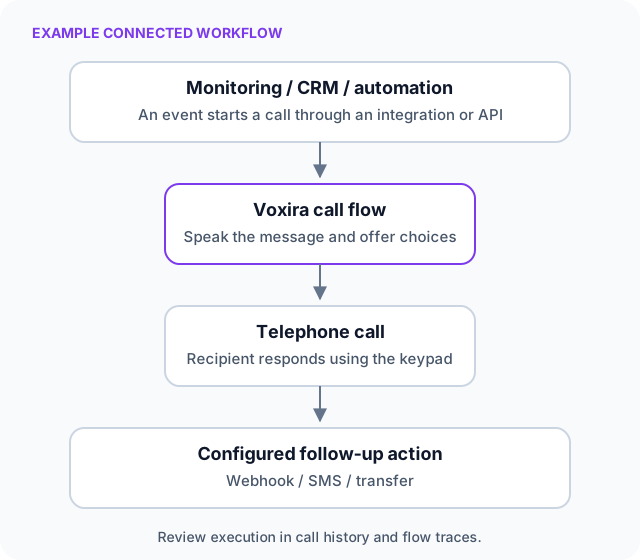
Turn monitoring alerts, automation events, and CRM updates into calls using available integrations, working templates, and installation guides.
Add voice calls to your own software
Start or schedule calls through a documented REST API. Pass dynamic information into reusable flows and send response data back through configured webhooks. API access is included; calls and service usage are charged separately.
Voxira powered by CloudAware helps you give important messages a voice. Detecting a problem is one step; calling the person who needs to act is another. Connect your monitoring or business workflow to Voxira to add telephone notifications for incidents, appointments, and customer updates.
Visit the Voxira product website.
How it works
- Create your call flow. Choose text-to-speech or a recording, then add keypad options and follow-up actions.
- Connect your trigger. Use an integration, an API request, a schedule, or a spreadsheet import to initiate calls.
- Review the outcome. Inspect call history and flow events; send response data to your systems through configured webhooks.
Shape the call around your message
Personalised spoken messages
Use text-to-speech in different languages and voices. Supply names, alert details, or appointment information for each call.
Reusable audio recordings
Upload recorded messages when you want a specific voice or an existing announcement.
Interactive keypad responses
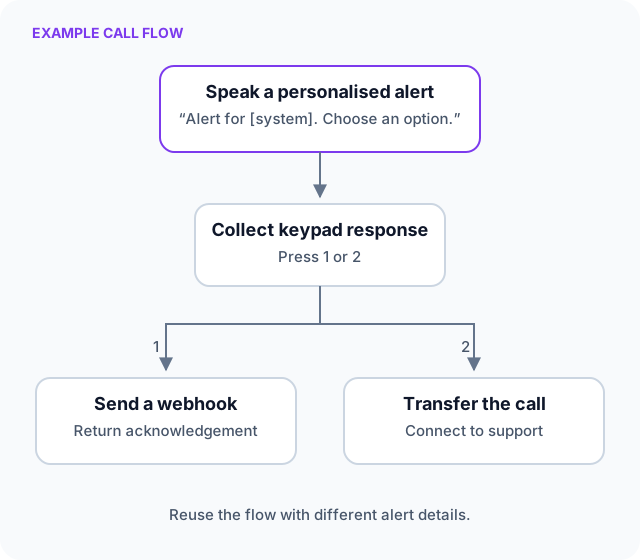
Let recipients acknowledge a message, choose an option, or enter digits, then follow the corresponding flow path.
Voicemail handling
Use beep-based voicemail detection to follow a dedicated path. Detection depends on the received audio and your configuration.
Verified caller ID
Use a verified organisation number so recipients can recognise the caller. Display depends on carrier routing.
Call logs and flow traces
Review call status and individual flow steps to understand execution and investigate failures.
Immediate or scheduled calls
Trigger calls when an event occurs, schedule them for later, or import calls in bulk from a spreadsheet. Export data for reporting.
Routing and follow-up actions
Branch by time or weekday, call webhooks, transfer to another number, or add SMS actions subject to availability and commercial terms.
Connect your existing workflow
Available integrations cover monitoring, automation, and customer workflows. Representative examples include:
| Your workflow | Integration examples |
|---|---|
| Monitoring and alerting | Zabbix, Icinga 2, PRTG, Grafana Alerting, Uptime Kuma, Checkmk |
| Network and security events | MikroTik RouterOS, FortiGate |
| Automation | Home Assistant, n8n, Node-RED, Zapier, Make |
| CRM and customer updates | HubSpot, Salesforce, SugarCRM, SuiteCRM |
| Your own software | REST API with curl, PHP, and Python examples |
Integrations use scripts, templates, webhook configuration, workflow actions, or reusable clients. Connecting an external system may require technical configuration, credentials, administrator access, or a suitable subscription.
Put voice notifications to work
These examples can be configured around your own systems and processes:
- IT and security alerts. Speak the affected system and incident details. Offer a keypad acknowledgement and send the response to your incident system through a configured webhook.
- Appointment reminders. Schedule a personalised reminder with options to confirm or request follow-up.
- Service and passenger updates. Turn a disruption, changed departure, or other important update into a spoken notification.
- Customer and payment reminders. Trigger calls from CRM events or business workflows, with an option to transfer to a team member.
Built for day-to-day use
Arrange personal dashboards for call activity, outcomes, and usage. A shared address book helps teams find recipients and import or export contacts through CSV or XLSX.
Google and Microsoft sign-in and multi-factor authentication are supported depending on configuration. API access controls, an encrypted webhook credential vault, and configurable usage alerts or blocking help teams manage access and unexpected calling activity.
For teams that need them, inbound call flows support messages, menus, and transfers with configured telephone numbers and PBX routing. An optional AI callflow assistant can explain flows and propose design changes for you to review, apply, and save.
Give your next important update a voice
Tell us which alerts, reminders, or customer updates you want to automate. We can discuss the call flow and connections that fit your organisation.