
Harden WordPress without friction
See posture at a glance, fix what matters first, and export audit-ready evidence—whether you run one site or thousands.
Instant security overview
Core, plugins, themes, 2FA, and configuration assessment.
Easy install via Wordpress Appstore
We have created and published an official Wordpress plugin to facilitate an easy install.
Audit-ready PDFs
Periodic reports with pass/fail evidence for stakeholders and auditors.
Deep‑dive features
Easy Install
Install the free plugin in seconds via Wordpress appstore.
Tamper detection
An MD5 hash of all plugin and theme folders is calculated.
Versions
The version of installed Wordpress core, themes and plugins is evaluated.
Updates
Available updates for Wordpress core, there and plugins are shown.
Clean old code
Deactivated, but installed plugins and themes are detected.
Autoupdates
Detect whether autoupdates are enbabled for Wordpress core, themes and plugins.
Vulnerabilities
Detection of vulnerabilities for installed plugins and themes.
Configuration evaluation
Evaluation of security related settings in Wordpress.
Flexibility
All data is available through Wordpress REST API or via push webhook.
Installation
- From the WordPress admin
- Go to Plugins → Add New
- Search for “CloudAware Security Audit”
- Install and Activate
- Using WP‑CLI
| |
Data access modes
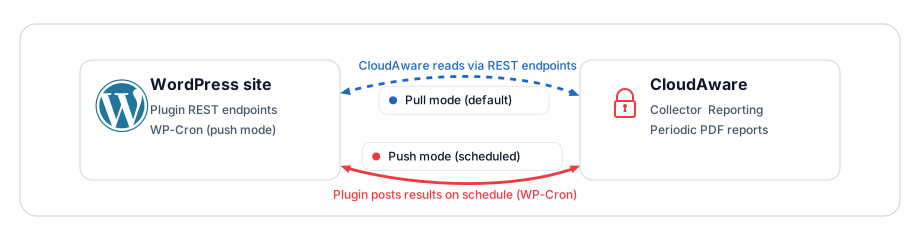
- Pull mode (default)
- CloudAware reads audit data via the plugin’s REST endpoints.
- Push mode (for locked‑down sites)
- The plugin posts audit data to a CloudAware endpoint on a schedule (via WP‑Cron).
- To disable push mode, remove or disable the plugin’s scheduled task (cronjob).
FAQ
Does this change my site’s behavior?
No. The plugin is read‑only for posture data and optional scheduled posts in push mode.What if my site has no public REST API?
You can use push mode. The plugin will deliver data to a webhook URL we will provide.Is it safe? We use as little rights as possible to get the data from WordPress. The API endpoint does not include any POST, PUT or DELETE methods, so it is read-only. If you do see a problem with this plugin, please contact us: https://cloudaware.eu/.well-known/security.txt